


When people think about using AI to get email done faster, they usually think about writing. Drafting the email, coming up with subject lines, spinning out a few versions to test. That is real and it is useful. But it is a small part of what is actually going on.
Most of the interesting work has nothing to do with words. It happens in the parts of the job nobody writes threads about. Working out whether your data is any good. Sorting new contacts as they come in. Blocking junk addresses before they land on your list. Turning a design into code you can send.
These jobs used to eat hours, or wait in a queue behind the ops team, or need a developer. Now one marketer can do them alone. Here are 5 AI workflows that marketers use in email campaigns:
1. AI as campaign builder, not copy assistant
AI gets used to write the copy that goes in an email. The subject line, the body, a few variations to test. But a lot of platforms can now build the whole workflow for you.
All you have to do is describe what you want, with the key details. It gives you back a draft flow with the trigger, the timing, the branches, and the message steps already in place.
How useful your workflow is depends on how much you tell it. A vague ask gets you a generic flow. The more specific you are, the closer it is to what you want.
Give AI:
- The trigger: What kicks off the sequence. A new subscriber, an abandoned cart, or a first purchase.
- Who qualifies: Are there any criteria for who should enter the workflow? New subscribers who haven’t bought yet, for example. The trigger says when it starts, this says who actually gets in.
- The timing: Give it when each step should fire relative to the one before it. For example: first email right away, then wait two days for the second, then five days for the third.
- The branches: The if-this-then-that paths the flow can split into based on what someone does. For example, if they click but don’t buy, send the review email; if they buy, take them out.
- The exclusions: The people who should never get pulled into the flow in the first place. For example, skip anyone who purchased in the last 30 days.
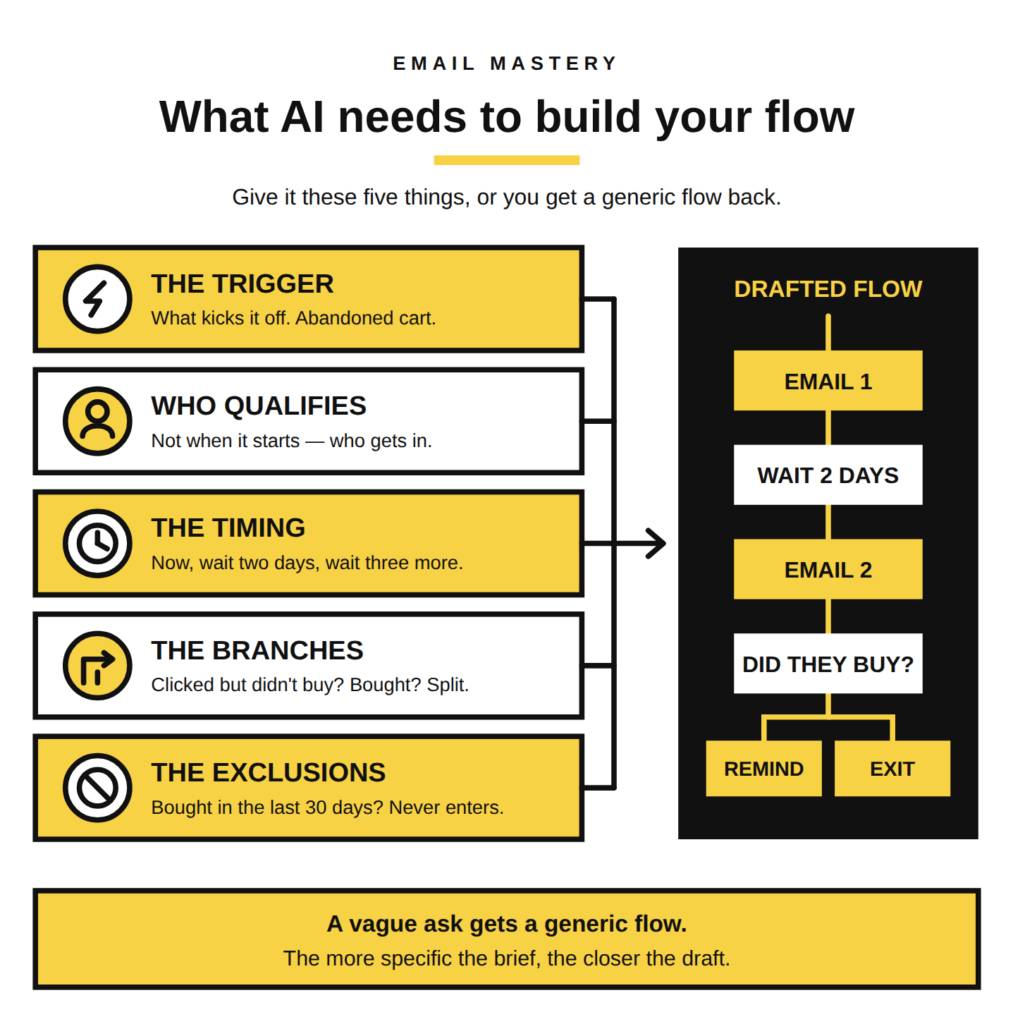
So instead of asking it to build a welcome flow, you’d say something like: “Build a welcome flow for new subscribers who haven’t bought yet, first email right away with the brand story, wait two days then send the bestseller with a 10% code, wait three more days then a reminder, and anyone who buys drops out.”
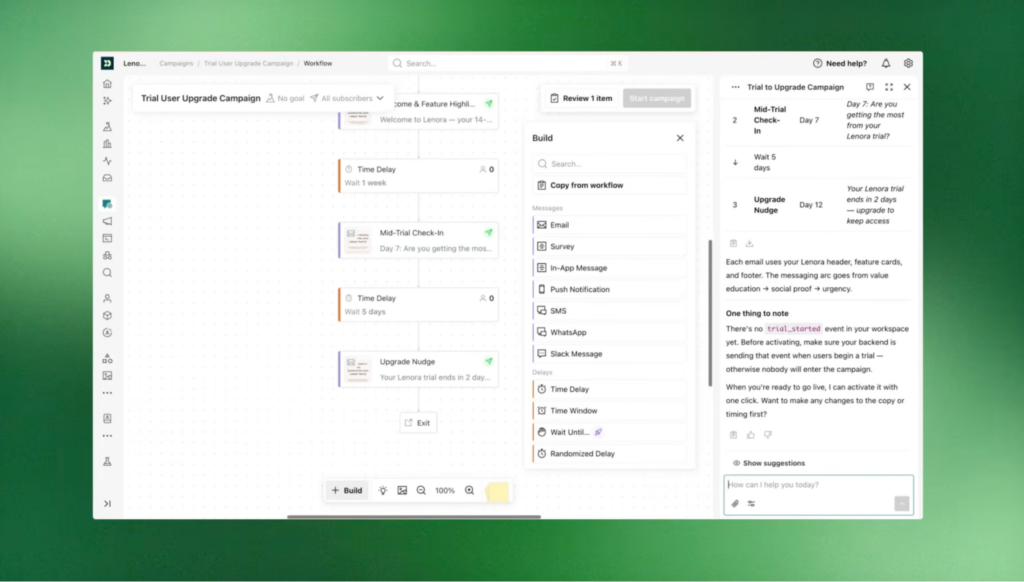
In a tool like Customer.io, the workflow gets laid out as a drag-and-drop map you can actually see, with the trigger, the branches, the time delays, and the A/B split all on one screen. You move a delay, redraw a branch, or change who qualifies without touching any code. And before it goes live, you can queue the messages as drafts and QA the whole thing, so a wrong turn gets caught by you and not by a customer.
2. AI as a first-pass data detective
Before you build a segment, you have to pick the attribute you are building it on, and real CRMs hand you more than one that could work. That is not sloppiness, it is what happens when data comes in from different places. Say you are running a promo for customers in California. Your platform might hold three location attributes: the region someone typed into the signup form, the state on the billing address from checkout, and the state from their most recent shipping address. All three are real. Each one came from a different source on a different day.
So you have to decide which to trust for this send. Signup region is the oldest and self-reported, so anyone who has moved is wrong. Billing can be a work address or a parent’s card. Shipping usually reflects where the person actually is now, but only if they have ordered recently. Sorting that out by hand, or grabbing the ops person who knows the data model, is the slow route.
AI can do it in one pass. You point it at the three attributes and a sample of records and ask which one to use for a current, physical-location segment. It comes back with something you can act on:
- Which is filled in: Shipping state is populated on most active buyers, while signup region is patchy.
- Which is current: Shipping updates with every order, signup region has not changed since the contact was created.
- Where they clash: It shows the share of contacts where billing and shipping disagree, so you know the risk before you hit send.
A couple of minutes and you know to build on shipping state, without pulling ops off their own work.
The whole thing rests on the data being halfway decent to start with. AI can only compare the attributes you already have. If all three location fields are old and half empty, it will tell you they are all weak, and it still cannot tell you where the customer actually lives. It points you to the best option on the table. It cannot add one that was never collected.
This gets easier when the AI sits inside the platform your data already lives in. Customer.io, a customer engagement platform has an AI Segment Builder where you describe the audience you want in plain language, like people who signed up in the last 30 days and viewed the pricing page, and it builds the segment logic for you. Because it is reading your real customer data instead of working blind, the attributes it points you to are the ones you actually have, not generic best-practice guesses. You still sanity-check the result, but you skip the part where you go digging through fields to find the right one.
3. AI making the judgment call at scale
Let’s say someone new comes into your app, and you want to give them a personalized experience. A wholesale buyer and a one-off gift shopper shouldn’t get the same welcome, the same offers, or the same follow-up. Before AI, the catch was that working out the persona of a buyer meant a human had to read the signals and make the call, one person at a time. That’s not scalable when you have hundreds of people joining an app every day.
AI does that sorting, easily and at scale.
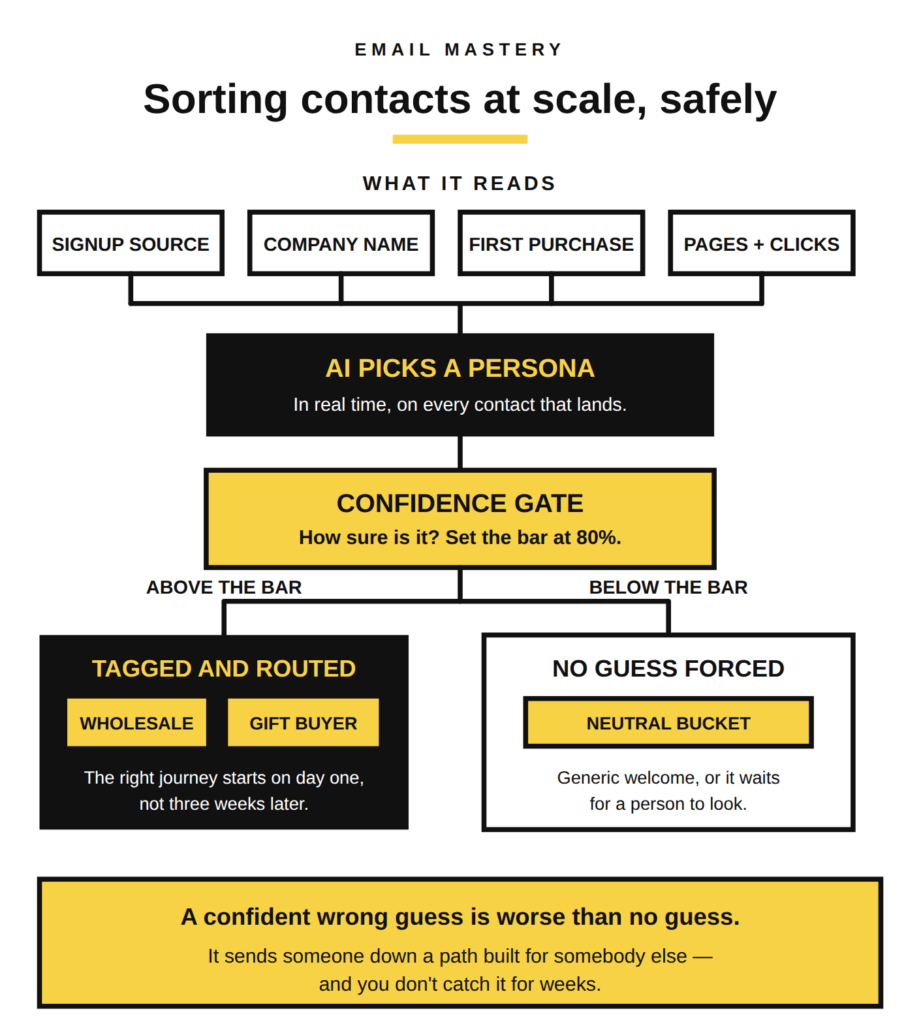
It reads whatever you have on them, like what they signed up for, the page they came in through, the company name, their first purchase, what they clicked, and drops them into a persona. It happens in real time, so the right journey starts on day one instead of three weeks later when someone finally gets around to tagging them by hand.
The thing that keeps this from going wrong is a confidence threshold.
You can tell AI to only assign a persona when it’s sure enough, say above 80 percent. Anything below that doesn’t get a guess forced onto it. It sits in a neutral bucket, gets a generic welcome, or waits for a person to look. A confident wrong guess is worse than no guess, because it sends someone down a path built for somebody else, and you don’t catch it until the numbers look off weeks later.
4. AI as a deliverability guardrail
Bad addresses cost you more than a bounce. Every fake signup, mistyped domain, and throwaway address that gets onto your list drags down your sender reputation, and once that reputation drops, your real messages start landing in spam for everyone, not just the junk ones. The damage gets done by a handful of addresses you never wanted in the first place.
A lightweight AI check at the signup form stops most of them at the door. The second someone submits, it looks at the address and flags the obvious problems:
- Typos in the domain. Things like gmial.com or hotmial.com that were never going to deliver.
- Disposable addresses. Throwaway domains built to self destruct in ten minutes.
- Clearly fake entries. Junk that no real person would sign up with.
Instead of letting those onto the list to bounce later, it quarantines them right there or nudges the person to fix the typo before they get through. The whole point is that this runs at the moment of capture, cheap and in real time, so the junk never becomes part of your data. You are not cleaning the list after the fact and eating the bounces. You are keeping it clean on the way in.
The one thing to watch is false positives. Make the check too aggressive and it starts blocking real people whose only crime is an unusual domain, and a blocked signup is a subscriber you will never hear from again. So it works best on the clear cases, the obvious typos and the known disposable domains, and stays out of the way on anything borderline.
5. AI collapsing the design-to-build handoff
The gap between a finished email design and an email you can send is usually a few hours of tedious work. A designer hands over the mockup, and someone has to turn it into email code that actually renders in Gmail, Outlook, and Apple Mail without falling apart. On a big team that is a developer’s afternoon. On a lean team it is you, at night, hand coding tables.
AI closes most of that gap. You give it the design and it hands back ready-to-send HTML, structured the way email clients need it. The layout, the spacing, the text, the buttons, the responsive parts, all coded and close enough to work from. Hours of copy and paste turn into a first version you can drop in and adjust.
The code you get doesn’t a few things so you’ll still have to:
- Export and host your assets: The product shots, the logo, and the graphics still get sliced, saved, and hosted by you.
- Get every image pixel right: Placement and sizing usually need a manual pass once it is in.
- Fill in alt text and links: The small details that make an image work in the inbox are still yours to handle.
You are still doing the image work by hand. What you are no longer doing is building the whole thing from scratch, and for a small team that is the difference between shipping the campaign today and pushing it to next week.
Where to start
You do not need to pick all 5 AI workflows . Pick the one that will save you the most time, or effort right now. If you spend hours hand-coding a design, start there. If your segments keep missing people, start with the data check. Take the job you already dread and hand the boring half of it to AI.
Start small. Run it on one flow, one form, one send where a mistake will not cost you much. Watch where it gets things right and where it needs you. Every one of these has a spot where it will confidently do the wrong thing, so the first few runs are really you learning where that line sits.
AI does the boring work and you make the decisions. It builds the flow, you check it. It reads the data, you pick what to do. That is the setup to get used to, because the next AI tool you try will work the same way. The people who get the most out of it are the ones who know which part is the computer’s job and which part is still theirs.